AI assistants
Post to Instagram from a chat you're already in.
pith.day speaks MCP, the standard assistants use to reach real apps. Connect your Instagram once and publishing your own content is free: hand your assistant a photo and a caption, it's live. When you want the content made FOR you, the daily AI loop is a sentence away: what's waiting, approve the good one, post it at nine thirty.
The address
Your assistant will ask for a server URL. This is it.
Streamable HTTP, with sign-in handled by pith.day. Nothing to install, no API key to paste, no token to keep safe.
Or read it on GitHub ↗In practice
Moments you'll recognize
A photo you took a minute ago
“Post this to my feed: fresh sourdough, 7am sharp.”
7:05, hands in the dough
“What's waiting for approval this morning? Approve it.”
Your menu is a PDF
“Here's my menu. Add every item as a product, with prices.”
It sounds too formal
“Make that caption warmer and lose the emoji.”
Sunday night, planning
“Fill next week with product posts.”
New item this week
“Add the pistachio babka at 32 shekels. Make tomorrow's draft about it.”
Your grid changed
“Pull my new photos and drop the ones with the old logo.”
Did it work?
“Did yesterday's story actually go out? Why not?”
You'd rather not think about it at all
“Every morning, read my Pith drafts. Approve one that names a product and publish it. Tell me what went out.”
How much is left
“How many stories do I have left this month?”
Setup
Two minutes, once
See it happen first
Claude
- Customize → Connectors → + → Add custom connector.
- Paste the address above.
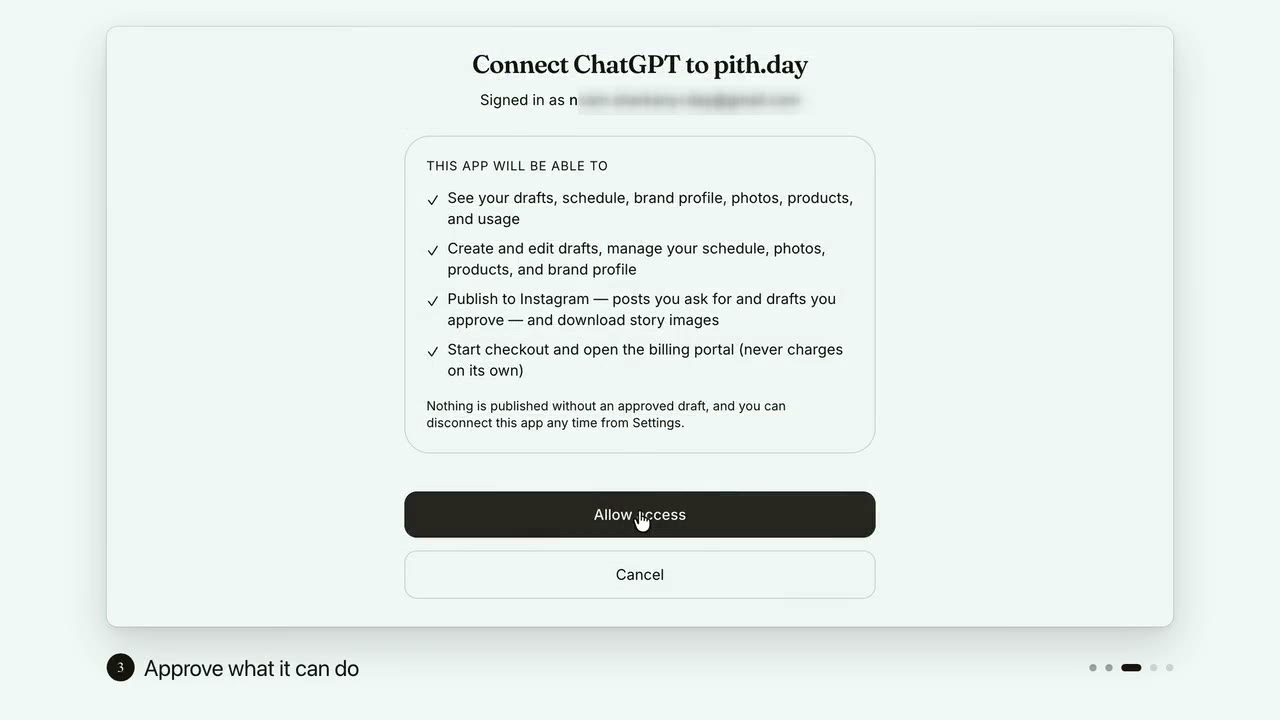
- Approve the connection when Claude sends you here.
Claude Code
- Run this in your terminal, then use /mcp to sign in.
Anything else
- Cursor, ChatGPT, your own agent: wherever the app asks for a remote MCP server, paste the address.
- If it asks which transport: streamable HTTP.
- If it asks for an API key: it doesn't need one. Sign-in happens in your browser.
Your assistant sends you here to sign in, with the same email or Google sign-in you already use, and shows you exactly what it's asking for before anything connects.
Capabilities
What a connected assistant can do
The full list, not a highlight reel. Every line below is a real thing your assistant can do on your behalf, using the same rules the app follows.
Your account
How the assistant finds you and which business it's working on.
- ViewSee which pith.day account is connected and what it's allowed to do
- ViewPull your profile: voice, active flow, Instagram connection, timezone
- EditSet up a new business from its Instagram handle. Scrape, brand voice, first drafts
- EditGet a one-time link that connects your Instagram account for publishing
- EditSend a message to a person at Pith, who replies by email
The daily drafts
The morning inbox, by chat. This is where most of the day happens.
- ViewSee what's waiting for approval this morning
- ViewRead one draft in full, image included
- EditApprove, reject, reword, or schedule a draft for later
- EditAsk for today's drafts now instead of waiting for the morning run
- EditRewrite a draft's text, optionally with a new angle
- EditTell pith one line about what is happening today, so tomorrow's stories are about it
Publishing
Your own content publishes free; drafts only ever from one you approved. The same rule as the app.
- PublishPublish your own image and caption to Instagram now. Story, feed post, or carousel
- PublishPost an approved draft to Instagram now
- PublishGet the story image to post yourself
The week ahead
Plan posts by date without opening the calendar.
- ViewSee everything queued and when it goes out
- EditAdd, move, or remove a scheduled post. Including filling a whole week
Your Brand DNA
The voice every draft is written from. Describe the change in words.
- ViewRead your voice, palette, and posting beats
- Edit"Warmer voice", "add a Friday specials beat", and it's changed
- EditAccept or dismiss a suggested update when your feed moves on
- EditStart the voice profile over from your current Instagram
- EditKeep only the photos worth generating stories from
Photos & products
The raw material the daily drafts are built from.
- ViewBrowse your uploads and your scraped Instagram photos
- EditAdd a photo from a link
- EditRemove a photo you uploaded
- EditPull your latest Instagram photos after your grid changes
- ViewSee the products your daily posts rotate through
- EditAdd a product, rename it, retire it, set its description or price, or attach photos to it
- EditTell pith your business website so it can learn from it
- EditRe-read your website for brand details, products, and photos
Your daily flow
Which loop feeds the mornings. Recycling, a campaign, products, or fresh ideas.
- ViewSee which flow is running and how it's set up
- EditSwitch flows or adjust the one you're on
- ViewRead the activity log. Why a draft was skipped or a publish didn't land
Plan & billing
Read-only, except for handing you a checkout link. Nothing is ever charged by the assistant.
- ViewCheck what's left this month and your posting streak
- ViewSee your plan and subscription state
- CheckoutGet an upgrade link to open yourself. It never charges on its own
Settings
The switches you'd otherwise hunt for in the app.
- EditChange your posting time, timezone, daily email, or WhatsApp pings
Permissions
What you're approving
Four permissions, in plain words: the same four lines you'll see on the approval screen before you connect anything.
- ViewSee your drafts, schedule, brand profile, photos, products, and usage
- EditCreate and edit drafts, manage your schedule, photos, products, and brand profile
- PublishPublish to Instagram — posts you ask for and drafts you approve — and download story images
- CheckoutStart checkout and open the billing portal (never charges on its own)
Assistants get View, Edit, and Publish by default; Checkout only if one asks for it. Every connection is listed in Settings → Connected apps, and disconnecting cuts it off immediately.
The fine print that matters
Four things worth knowing
Nothing posts without your approval
An assistant can only publish a draft that has been approved by you, in the app or by telling it to. Same rule as the inbox. There is no path around it.
Some answers take a minute
Drawing a story image or generating a fresh day of drafts calls the image model. Sixty to ninety seconds is normal, and your assistant will sit and wait for it.
Downloads count on Free
Asking for a story image to post yourself spends one of your monthly stories the first time you ask for that draft, the same as it does in the app.
You can cut it off any time
Settings → Connected apps shows every assistant you've connected, what it may do, and when it last did anything. Disconnect is instant.
Questions
Does it cost extra?
No. It's included on every plan, Free included. Your usual monthly limits apply either way. Connecting an assistant doesn't buy you more stories, it just makes them easier to approve.
Do I have to use it?
Not at all. The inbox, the daily email, and WhatsApp approvals keep working exactly as they do now. This is another door into the same house.
Can my assistant read my Instagram messages?
No. It talks to pith.day, not to Instagram, and pith.day never reads your DMs or your followers' details. Publishing an approved post is the only thing that touches your account.
What if the assistant gets something wrong?
You still approve every post, and every action shows up in the app the same way as if you'd done it there. Wrong caption? Ask it to rewrite the draft, or fix it in the inbox.
Which assistants work?
Anything that supports remote MCP servers over streamable HTTP with sign-in: Claude, Claude Code, Cursor, and a growing list of others.
Try it on this morning's drafts.
Connect once, then ask what's waiting. If it doesn't earn its place, disconnect it in two clicks.